Syndicated Programming Guide
Tutorials on running tech for live-to-air studio sessions
Syndicated Programming Guide
What is Syndicated Programming?
Broadcasting live musical performances direct-to-air. This specific article discusses the scenario where you have performers in the GLR studios and you want to put them on air.
Definitions
- GLR - Green Line Records
- Recording Studio - the space where live performers and mics are placed
- Control Room - the attached control room with view of the performers containing the mixing and recording hardware.
- Broadcast room - either the Podcast or On-air studios, containing Axia consoles capable of routing audio to the WRBB broadcast stream.
Required Personnel
- GLR approved recording engineer
- WRBB approved broadcast engineer
- WRBB on-air operator/personality
One person must be in the control room mixing down audio from all channels to a single stereo output from the presonus to the WRBB digital audio network (via the xNode). Another person must be at a broadcast console in either the on-air or podcast studios to act as board operator/host.
How to run Syndicated Programming
- Set up performers in studio and their respective microphones/amps/instruments.
a. Note: if phantom power is needed, it must be provided from the GLR preamps as the WRBB analog feed to the presonus console is passive - have the operator in the broadcast studio select the “GLR” profile to bring up the GLR mixdown channel. Check that the talkback functionality routes to the performer headphones properly
- when ready to go to air, simply arm the respective broadcast studio and turn on and bring up the GLR mixdown fader.
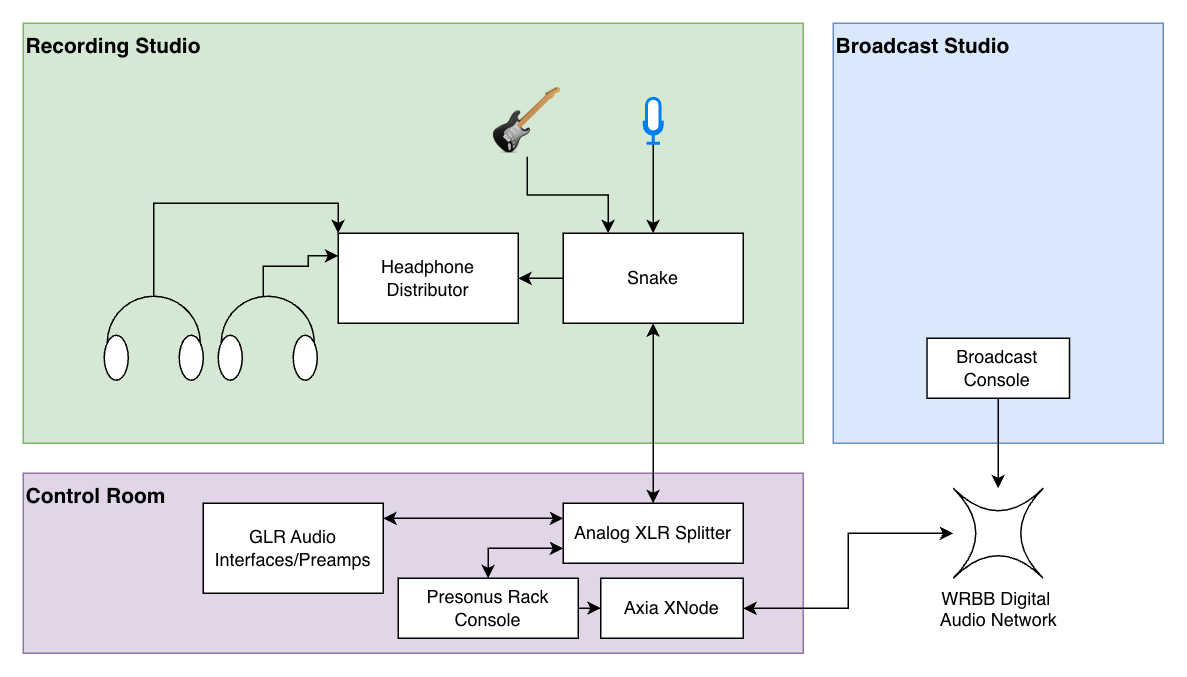
Notes:
- Always ask GLR for help in the recording channel in their slack
- Book on their calendar at least 90 mins before and 30 after
Mixing on the Presonus StudioLive 24R
To mix, download the universal control app (https://www.presonus.com/pages/universal-control) and connect your laptop to the USB-B port on the back of the rackmount console.
Talkback Routing
The audio routed from the WRBB network to the presonus and then to the studio headphone distributor is referred to as a "Mix-minus". This means that the talent in the recording studio will hear everything besides themselves from the broadcast console to prevent odd-delays and feedback. this also allows the console operator to talk to the talent via the "talk" softkey on the broadcast console channel strip for the GLR mixdown feed.